Checklist OAI 2024 Stage I · Task 2
Imbalanced Classification
Polish title: Niezbalansowana klasyfikacja
Train a PyTorch convolutional network that separates noisy synthetic "normal" and "onion" shape images when the training set is imbalanced and the test set is balanced.
The task
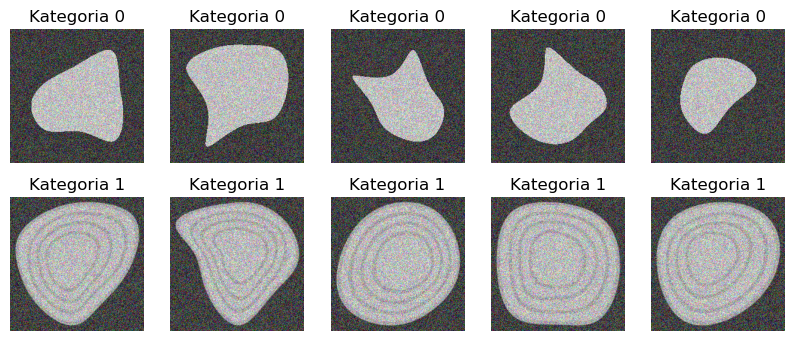
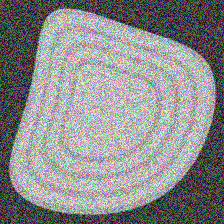
The contestant implements YourCnnClassifier, a convolutional neural network written in PyTorch that assigns 224×224 JPEG images to one of two classes: normal (label 0) and onion (label 1). Normal images show light-grey shapes on a black background; onion images additionally contain dark-grey bands forming layers inside the shapes, resembling an onion. All images are noisy.
The class must expose two class methods: load, which reads the parameters from cnn-classifier.pth (used during testing), and create_with_training, which trains the model and saves its parameters to that file. The supplied training set is imbalanced, whereas the solution is tested on a balanced set so that accuracy is meaningful.
A trivial classifier that always predicts "normal" is provided and scores 0 points on a balanced test set.
Abridged and translated by SOTA from the official Polish materials. The official statement has the exact rules, and it wins wherever this summary differs.
In English
This task was published in Polish. SOTA translated it into English on 16 September 2026. Only the words changed in the notebooks: markdown, code comments, messages and printed output. The code, file names and paths are the original's, so a translated notebook runs with the original data.
Read the task notebook in English
Imbalanced classification
Introduction
Image classification is the process of assigning a label to an image on the basis of its content. For example, we would like our computer program to be able to recognise whether an image shows a cat, a dog, a car, an aeroplane or perhaps something completely different. Nowadays, a popular tool for image recognition is the so-called convolutional neural network (CNN).
Convolutional networks are a type of neural network that can analyse and recognise patterns in visual data.
In image classification, a convolutional network consists of several layers, including convolutional and pooling layers. Convolutional layers are used to extract features from the image, pooling layers then reduce the dimensions of the data, and finally fully connected layers are used to classify the image.
Progressively shrinking the layers allows networks to recognise increasingly abstract features as compositions of many smaller features, e.g. a bird is something that has a beak and is feathered. A beak, in turn, is e.g. a sharp shape of a yellowish colour, and plumage means being covered with a large number of small strokes.
Task
Implement a classifier YourCnnClassifier that recognises images and classifies them into two classes. It should be a convolutional neural network written with the pytorch package.
Your data in this task are images in *.jpg format with dimensions 224 x 224. These images fall into two categories: normal and onion, which have been assigned the labels 0 and 1 respectively.
Images of the normal class show light-grey shapes on a black background. Images of the onion class differ in that they have added dark-grey bands forming layers inside the light-grey shapes, which makes them resemble an onion. All the images are additionally noisy.

The public interface of the class YourCnnClassifier must consist of two methods (class methods, to be precise):
load- must load the model parameters from the filecnn-classifier.pth. We will use this when testing your solutioncreate_with_training- must train the model and save its parameters to the filecnn-classifier.pth.
Scoring criterion
Your solution will be scored on the basis of classification accuracy
The criterion above, the abstract class describing the model interface, and the data loading are implemented by us below. We also give an example of a trivial classifier that always claims that a sample is normal. Consequently, when tested on the balanced test set, it scores 0 points.
Submission files
- This notebook
- A file containing the model weights, named
cnn-classifier.pth
Note: The training dataset we provide is imbalanced, whereas your solution will be tested on a balanced set, so that the accuracy metric is meaningful. Take this into account when building your model.
Constraints
- Evaluating your solution (without training, with the flag
FINAL_EVALUATION_MODEset toTrue) on 50 test examples should take no longer than 2 minutes on Google Colab without a GPU. - Running the script on Google Colab without a GPU with the flag
FINAL_EVALUATION_MODEset toFalseshould train the model and generate the weights file in no more than 15 minutes. - The size of the file
cnn-classifier.pthmust not exceed 35MB.
Evaluation
Remember that during checking the flag FINAL_EVALUATION_MODE will be set to True. Using the script validation_script.py, you can make sure that your solution will be executed correctly on our grading servers.
For this task you can score between 0 and 1 point. The number of points you receive will be equal to the value of score computed on the test set.
Starter code
######################### DO NOT CHANGE THIS CELL WHEN SUBMITTING ##########################

FINAL_EVALUATION_MODE = False
# While checking your solution, we will change this value to True
# The value of this flag M U S T be set to False in the solution you send us!
######################### DO NOT CHANGE THIS CELL WHEN SUBMITTING ##########################
import abc
import os
import glob
import gdown
import numpy as np
import torch
import torch.nn as nn
import torch.optim as optim
import torchvision
import matplotlib.pyplot as plt
import zipfileLoading the data
######################### DO NOT CHANGE THIS CELL WHEN SUBMITTING ##########################

GDRIVE_DATA = [
    ("1bR87z7ZI3gLK0vAGkyr_cnVGZ9P9bO7A", "train_data.zip"),
    ("1TA0lWnjJCv3lyRMML4JNHsJz3RJ-TUwZ", "valid_data.zip"),
]

def download_data():
    for file_id, zip_name in GDRIVE_DATA:
        folder_name = zip_name.split(".")[0]
        if not os.path.exists(folder_name):
            url = f'https://drive.google.com/uc?id={file_id}'
            gdown.download(url, output=zip_name, quiet=True)
            with zipfile.ZipFile(zip_name, 'r') as zip_ref:
                    zip_ref.extractall(folder_name)
            os.remove(zip_name)

download_data()

class ImageDataset(torch.utils.data.Dataset):
    """Implementation of torch's dataset abstraction."""
    def __init__(self, dataset_type: str):
        self.filelist = glob.glob(f"{dataset_type}_data/*")
        self.labels   = [0 if "normal" in path else 1 for path in self.filelist]

    def __len__(self):
        return len(self.filelist)

    def __getitem__(self, idx) -> tuple[torch.Tensor, int]:
        if torch.is_tensor(idx):
            idx = idx.tolist()
        image = torchvision.transforms.functional.to_tensor(plt.imread(self.filelist[idx])[:,:,0])
        label = self.labels[idx]
        return image, label

    def loader(self, **kwargs) -> torch.utils.data.DataLoader:
        """
        Create a `DataLoader` for the current dataset.

        All `**kwargs` will be passed to the constructor of `torch.utils.data.DataLoader`.
        In short, `DataLoader`s are a data-loading abstraction that provides a convenient interface.
        You can learn more about them here: https://pytorch.org/docs/stable/data.html#torch.utils.data.DataLoader
        """
        return torch.utils.data.DataLoader(self, **kwargs)

train_dataset: ImageDataset = ImageDataset("train")
valid_dataset: ImageDataset = ImageDataset("valid")
Code with the scoring criterion
######################### DO NOT CHANGE THIS CELL WHEN SUBMITTING ##########################

def accuracy_to_points(accuracy: float) -> float:
    """Compute the score from the prediction accuracy."""
    return (round(accuracy, 2) - 0.5) * 2 if accuracy > 0.5 else 0.0

def grade(model):
    """Assess how many points the current task will receive."""
    model.eval()
    test_loader = valid_dataset.loader()
    correct = 0
    total = 0
    with torch.no_grad():
        for [images, labels] in test_loader:
            outputs = model(images).squeeze()
            incorrect_indices = torch.where((outputs > 0.5).int() != labels)[0]
            correct += len(labels) - len(incorrect_indices)
            total += len(labels)
        accuracy = correct / total if total != 0 else 0
        if not FINAL_EVALUATION_MODE:
            print(f"Accuracy: {int(round(accuracy, 2) * 100)}%")
        return accuracy_to_points(accuracy)
Public interface of the solution
This is all we require of your class; in your solution you may modify your class as you wish, adding new methods and class attributes - anything you need to solve the task.
######################### DO NOT CHANGE THIS CELL WHEN SUBMITTING ##########################

class CnnClassifier(torch.nn.Module, abc.ABC):
    MODEL_PATH: str = "cnn-classifier.pth"

    @classmethod
    def load(cls):
        """Load the model from a file."""
        model = cls()
        model.load_state_dict(torch.load(cls.MODEL_PATH))
        return model


    @classmethod
    @abc.abstractmethod
    def create_with_training(cls):
        """Save the model to a file."""
        pass
Example solution
Below we present a simple solution which is obviously not optimal. Its purpose is to show how the whole notebook is meant to work.
######################### DO NOT CHANGE THIS CELL WHEN SUBMITTING ##########################

if not FINAL_EVALUATION_MODE:
    class DummyCnnClassifier(CnnClassifier):
        def forward(self, x):
            batch_size, *_ = x.shape
            return torch.zeros(batch_size)

        @classmethod
        def create_with_training(cls):
            return cls()

    dummy_model = DummyCnnClassifier.create_with_training()
    print(f"DummyCnnClassifier -- Score: {grade(dummy_model)} pts")

    del dummy_model
    del DummyCnnClassifier
Your Solution
class YourCnnClassifier(CnnClassifier):
    def forward(self, x):
        batch_size, *_ = x.shape
        return torch.zeros(batch_size)

    @classmethod
    def create_with_training(cls):
        return cls()
######################### DO NOT CHANGE THIS CELL WHEN SUBMITTING ##########################
your_model = YourCnnClassifier.load() if FINAL_EVALUATION_MODE else YourCnnClassifier.create_with_training()Evaluation
######################### DO NOT CHANGE THIS CELL WHEN SUBMITTING ##########################

def evaluate_model(model):
    """Assess how many points the current task will receive."""
    return grade(model)
######################### DO NOT CHANGE THIS CELL WHEN SUBMITTING ##########################
if not FINAL_EVALUATION_MODE:
print(f"YourCnnClassifier -- Score: {evaluate_model(your_model):.2f} pts")Translated by SOTA. The Polish original is the official version and wins wherever the two differ. If you organise this olympiad and would like the translation removed, email [email protected] and we will take it down.
At a glance
- You get
train_data.zipandvalid_data.zip(224×224 JPEG images, class encoded in the file name), downloaded from Google Drive with gdown.- You submit
- This notebook and the model weights file
cnn-classifier.pth. - Scoring
- score = 0 if accuracy < 0.5, otherwise (accuracy − 0.5) × 2 (accuracy rounded to two decimals in the provided code), on a balanced test set; the points awarded equal the score (0–1).
- Rules
- Evaluation without training (FINAL_EVALUATION_MODE = True) on 50 test examples must take at most 2 minutes on Google Colab without a GPU.
- With FINAL_EVALUATION_MODE = False the notebook must train the model and write the weights in at most 15 minutes on Google Colab without a GPU.
cnn-classifier.pthmust not exceed 35 MB.- Python 3.11 with the packages pinned in the repository-level
requirements.txt; avalidation_script.pyin the task folder checks that the notebook runs with FINAL_EVALUATION_MODE = True.
- Format
- Stage I (online, solved at home), 22 April – 27 May 2024; notebook submitted through the Olympiad's submission website and scored automatically. Worth up to 1 point of the stage total of 10.