Checklist NEOAI 2026 Day 2 · Task 5
SOTA-AI Editorial
Creatures of the Static
Train a 5-class image classifier on 50 clean images and apply it to 5,000 test images distorted by an unknown domain shift, without pretrained models.
Hints
Hint 1
Observe the training and test images.
The solution in one line
Reverse the transformations applied to the test images to make them similar to the training images.
The editorial
Dataset Analysis
Each training image contains an object with a solid color on a dark, solid background. Each category contains images of the same object shape, regardless of its color.
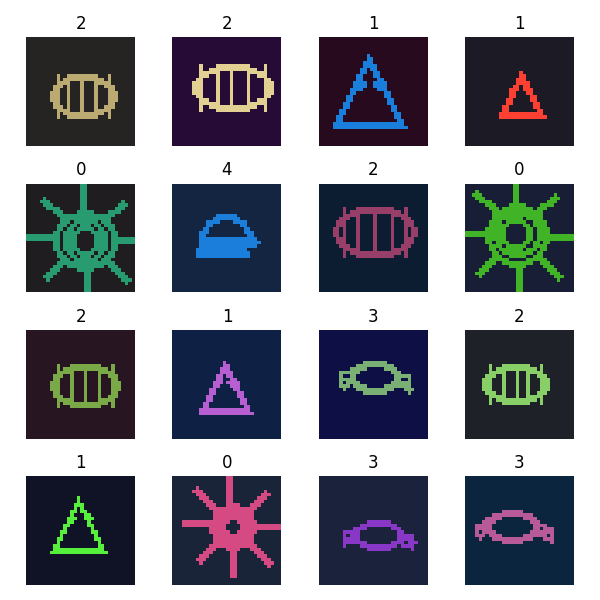
However, the test images contain noise and are overlaid with rectangles.
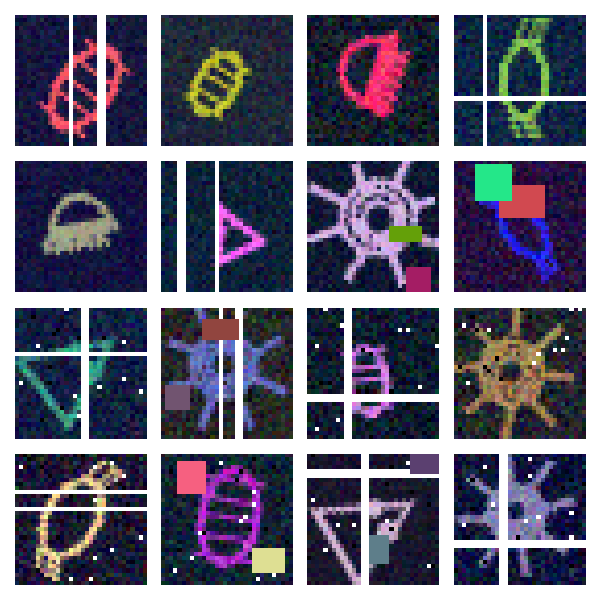
We can observe that each image is generated through the following steps:
- Start with an image from the same distribution as the training dataset and rotate it.
- Add noise.
- Select some pixels (possibly none) and color them white.
- Select some rows or columns (possibly none) and color them white.
- Repeat the following process some number of times (possibly zero): choose a rectangle and fill it with a solid color.
Solution
The solution reverses steps 2–5 for each test image to obtain an image with a distribution similar to that of the training images.
First, initialize a mask removed with shape (32, 32) and fill it with zeros.
-
Reverse step 5
While there is a rectangle with an area of at least four such that all pixels with
removed[r][c] = 0have the same value, setremoved[r][c] = 1for every pixel in this rectangle. -
Reverse steps 3 and 4
Set
removed[r][c] = 1for every white pixel.For each pixel with
removed[r][c] = 1, replace its color with the color of the closest pixel(r2, c2)such thatremoved[r2][c2] = 0. -
Reverse step 2
By observing the noise distribution in several images, the noise seems to be drawn from a normal distribution.
Because the original image consists of two colors (background and foreground), we can use a Gaussian Mixture Model to estimate the two normal distributions. Then, identify the distribution with the smaller weight and classify pixels belonging to it as noise. These pixels are colored white, while the remaining pixels are colored black.
To further remove the noise, we remove all connected components with an area smaller than four.
Since the training images have the same orientation while the test images are rotated by different amounts, we augment the training dataset by rotating each training image by different angles.
To make the model invariant to the original colors, we convert the object to white and the background to black.
In this solution, we use classical machine learning models instead of CNNs because the images can be classified easily using their shape information.
To make the model translation-invariant, we crop the object from each image and resize it to the same size.
Result
| Method | Public score | Private score |
|---|---|---|
| Baseline | 0.312 | 0.319 |
| Preprocessing + Logistic Regression | 0.896 | 0.891 |
| Preprocessing + SVM | 0.904 | 0.917 |
Preprocessing + KNN (k=5) |
0.969 | 0.978 |
Alternative Approaches
Another possible approach is to augment the training dataset and train a larger model, such as a CNN. With augmentation similar to that applied to the test dataset, the model may learn stronger features for each category.
However, this approach was not explored in this solution.
Running Time
Preprocessing, training, and testing take approximately 3 minutes on a CPU.
Code
Solution code
import numpy as np
import cv2
from PIL import Image
from tqdm import tqdm
from sklearn.mixture import GaussianMixture
from sklearn.neighbors import KNeighborsClassifier

IMAGE_SIZE = 32
CROP_SIZE = 16
ROTATION_STEP = 15


def preprocess(img, theta=0, train=False):
    img = np.asarray(img, dtype=np.uint32)

    if not train:
        # Encode each RGB color as a single integer.
        tmp = img[:, :, 0] + img[:, :, 1] * 256 + img[:, :, 2] * 256 * 256

        colors, counts = np.unique(tmp, return_counts=True)

        rectangles = []

        # Find connected components of each sufficiently common color.
        for color, count in zip(colors, counts):
            if count < 4:
                continue

            mask = (tmp == color).astype(np.uint8)

            n, _, stats, _ = cv2.connectedComponentsWithStats(
                mask,
                connectivity=4,
            )

            for cc in range(1, n):
                x1, y1, w, h, _ = stats[cc]
                x2 = x1 + w
                y2 = y1 + h
                rectangles.append((x1, y1, x2, y2, color))

        removed = np.zeros(
            (IMAGE_SIZE, IMAGE_SIZE),
            dtype=bool,
        )

        # Remove solid rectangles.
        changed = True
        while changed:
            changed = False
            remaining = []

            for x1, y1, x2, y2, color in rectangles:
                region = (tmp[y1:y2, x1:x2] == color) | removed[y1:y2, x1:x2]

                if region.all():
                    removed[y1:y2, x1:x2] = True
                    changed = True
                else:
                    remaining.append((x1, y1, x2, y2, color))

            rectangles = remaining

        # Remove white pixels.
        removed[(img == 255).all(axis=2)] = True

        # Replace removed pixels with the color of the closest
        # non-removed pixel.
        p0 = np.argwhere(~removed)
        p1 = np.argwhere(removed)

        dist = np.linalg.norm(
            p1[:, None, :] - p0[None, :, :],
            axis=2,
        )
        nearest = dist.argmin(axis=1)

        img[p1[:, 0], p1[:, 1]] = img[
            p0[nearest, 0],
            p0[nearest, 1],
        ]

    # Separate foreground and background using a two-component GMM.
    gmm = GaussianMixture(
        n_components=2,
        covariance_type="tied",
    ).fit(img.reshape(-1, 3))

    probabilities = gmm.predict_proba(img.reshape(-1, 3))
    foreground_component = gmm.weights_.argmin()

    img2 = (
        (probabilities[:, foreground_component] >= 0.7)
        .reshape(IMAGE_SIZE, IMAGE_SIZE)
        .astype(np.float32)
    )

    # Remove small connected components.
    n, labels, stats, _ = cv2.connectedComponentsWithStats(
        img2.astype(np.uint8),
        connectivity=4,
    )

    for i in range(1, n):
        if stats[i, cv2.CC_STAT_AREA] < 4:
            img2[labels == i] = 0

    # Rotate the image.
    M = cv2.getRotationMatrix2D(
        (IMAGE_SIZE / 2, IMAGE_SIZE / 2),
        theta,
        1.0,
    )
    img2 = cv2.warpAffine(
        img2,
        M,
        (IMAGE_SIZE, IMAGE_SIZE),
    )

    # Crop to the object and resize.
    xx, yy = np.where(img2 > 0)
    x1, x2 = xx.min(), xx.max()
    y1, y2 = yy.min(), yy.max()

    img3 = cv2.resize(
        img2[x1 : x2 + 1, y1 : y2 + 1],
        (CROP_SIZE, CROP_SIZE),
    )

    return img3


def solution(df, test):
    X = []
    y = []

    # Augment the training set with rotations.
    for idx in tqdm(range(len(df))):
        img = Image.open(f'compet_data/train/{df.loc[idx, "id"]}')

        for theta in range(0, 360, ROTATION_STEP):
            X.append(preprocess(img, theta, train=True))
            y.append(df.loc[idx, "label"])

    X = np.stack(X).reshape(len(X), -1)
    y = np.asarray(y)

    knn = KNeighborsClassifier(n_neighbors=5)
    knn.fit(X, y)

    X_test = []

    for idx in tqdm(range(len(test))):
        img = Image.open(f'compet_data/test/{test.loc[idx, "id"]}')
        X_test.append(preprocess(img))

    X_test = np.stack(X_test).reshape(len(X_test), -1)

return knn.predict(X_test)Editorials are written by members of the SOTA community, not by the olympiad. The official statement and scoring win wherever an editorial differs.